1. Format

  • Files supported for presentation are Microsoft PowerPoint (PPT) and PDF.
  • All oral speakers should format their presentations in 16:9 ratio to better fit the presentation screens.
  • A dedicated computer will be provided for all presentations. Presenters are strongly encouraged to use the provided conference computer to minimize potential delays caused by switching between personal laptops. The use of personal laptops, particularly MacBooks, is not recommended unless specialized software or hardware is required for the presentation.
  • If your presentation includes music, video, or other multimedia content, please test all multimedia files in the Preview Room before your session to ensure proper playback.

Specifications of the Conference-Provided Presentation Computer

  • Operating System: Window 11, English version
  • Microsoft Office 2023
  • Adobe Acrobat Reader 2026.002.21901 (64-bit)
  • Supported Fonts: Windows standard fonts
    - Standard Windows fonts are strongly recommended to avoid display issues or font substitution during presentations.
    - If special fonts are used, please embed them in the PowerPoint file or convert the presentation to PDF format.

2. Presentation time

Presentation Type Duration
Keynote presentations Each will have 30 minutes total incl. 5min Q&A
Invited presentations Each will have 25 minutes total incl. 5min Q&A
Standard oral presentations Each will have 20 minutes total incl. 5min Q&A

3. Presentation file submission and testing

  • Oral presenters are required to upload their presentation files to the Google Drive in the Preview Room by the day before their scheduled session.
  • Presenters can also test their presentation files in the Preview Room before their session.
  • If your presentation includes music, video, or other multimedia content, please make sure to test these files in the Preview Room as well.

4. Before Your Presentation

  • Speakers are requested to arrive at the session room 10 minutes before the start of their session and report to the Session Chair.
  • If you would like to use your own laptop, a STAFF in the session room can assist you with connecting your laptop to the projector. Please note that the time required to connect your laptop will be included in your allotted presentation time.
  • As a backup, please bring a USB drive containing a copy of your presentation files.

5. Presentation Guidelines

  • Please present the material as described in your submitted and approved abstract.
  • Please keep your presentation within the allotted presentation time.
  • Date & Time: October 21 (Wed.), 13:10-15:10
  • Location: Gallery, 1F
Location : Gallery, 1F Poster Session
Put-up 09:00-13:10
Presentation 13:10-15:10
mandatory presentation time Topic 1, 3, 5, 7, 9: 13:10-14:10
Topic 2, 4, 6, 8, 10: 14:10-15:10
Take-down 15:10-17:00

※ Student Awards judging will be conducted during the Mandatory Presentation Time.
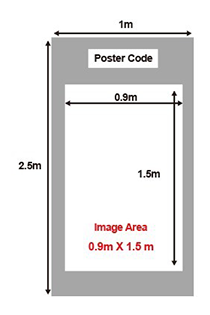
  • Poster Panel Size: 1.0m (Width) x 2.5m (Height)
  • General Instructions
    • Poster boards are self-standing.
    • Each paper's unique code will be clearly displayed on the respective board.
    • Tape for mounting posters will be provided for your convenience.
    • The use of double-sided tape is strictly prohibited.
    • All presenters are required to be present at their assigned poster panel during the designated session time to engage in discussions with attendees.
    • Poster authors are responsible for the design, preparation, and transportation of their posters to the conference venue.
    • Each poster must clearly indicate the paper title, authors, affiliations, and abstract number, and must adhere to a maximum size of 0.9m x 1.5m.

Organized by

Sponsored by

어.